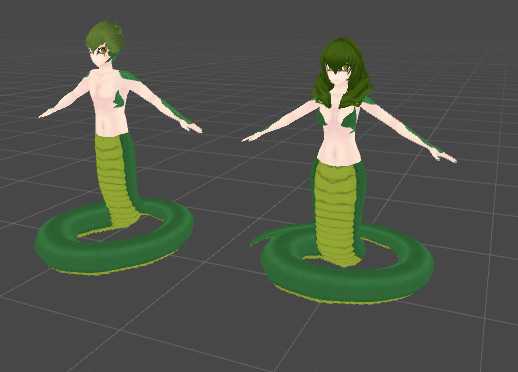
Naga Lamia Templates
Back to full item page
#2
A quick check that you are a person keeps downloads free. Once it is done, the download button unlocks.
5 of 5 free downloads left today.
Sign up to get 100 downloads per day for free.
Want more like this?
Sign in to follow and get alerts
All downloads
3 files for this item
ago
Updated ago
File: 5127
Size: 15.5 MB
Type: unitypackage
Avatar
PC Poor
Quest No
54.7k Polygons
119 Bones
41 Blendshapes
8 Dynamic Bones
11.4 MB Textures
SDK
VRChat SDK2 Avatar
Avatar setup
Avatar Descriptor
Lip Sync (Visemes)
Full Body Ready
Custom Locomotion
Viewpoint set
Rig & mesh
Humanoid Rig
Facial Blendshapes
Blendshapes
Dynamics
Dynamic Bones
Dynamic Bone Colliders
Content
Animation Clips
Audio
Custom Shaders
Animator Controllers
Scenes
Realtime Lights
C# Scripts
Textures
Platform
PC Only
Why it is not Quest compatible
- Polygons: 54,719 exceeds the 20,000 mobile limit
- Uses PC-only shaders; Quest requires VRChat/Mobile shaders
- Realtime lights are removed on Quest
- Avatar audio sources are removed on Quest
PC rank is limited by
- Realtime lights: 1 (Poor)
- Dynamic Bone colliders: 1 (Medium)
- Dynamic Bone components: 8 (Medium)
- Audio sources: 4 (Good)
- Bones: 119 (Good)
Avatars in this package
Naga_templates
Poor
Models
c1.fbx
naga_male.fbx
naga_female.fbx
tail.FBX
Shaders used
CubedParadox/Simple Gradient Sky
CubedParadox/Unit Shadowed
Standard(Two Sided)
Measured automatically from the uploaded package. Performance ranks are an estimate of VRChat's own rating.
How to install
- Install the VRChat Creator Companion and create an avatar project. It picks the Unity version VRChat supports.
- Make sure the VRChat Avatars SDK is added to the project in the Creator Companion.
- Open the project in Unity and import the .unitypackage with Assets, Import Package, Custom Package.
- Open the included scene or drag the avatar prefab into your scene.
- Open VRChat SDK, Show Control Panel, sign in, then use Build & Test or upload.